


Blender
 by Justo
Dec 19, 2020 |
0
Votes |
91
Used |
0
Reviews
by Justo
Dec 19, 2020 |
0
Votes |
91
Used |
0
Reviews
 -
rate
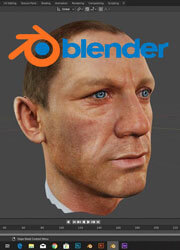
Blender is a free and open source 3D computer graphics suite built with the combined efforts of artists, scientists, students, visual effects experts, animators, game artists, artists, and other professionals around the world. Feature-rich and intuitive, the software is used for creating animated films, visual effects, arts, 3D printed models, 3D applications, and video games.
Try Now
Similar Software
-
rate
Blender is a free and open source 3D computer graphics suite built with the combined efforts of artists, scientists, students, visual effects experts, animators, game artists, artists, and other professionals around the world. Feature-rich and intuitive, the software is used for creating animated films, visual effects, arts, 3D printed models, 3D applications, and video games.
Try Now
Similar Software
People Also Played


Introduction
Blender is a free and open source 3D computer graphics suite built with the combined efforts of artists, scientists, students, visual effects experts, animators, game artists, artists, and other professionals around the world. Feature-rich and intuitive, the software is used for creating animated films, visual effects, arts, 3D printed models, 3D applications, and video games.
Features
Blender is known to have a very intuitive and easy to understanding modeling workflow and it has all the tools required for creating, modifying animated films, visual effects, arts, 3D printing models, interactive 3D gaming models. It is used for 3D modeling, UV Unwrapping, raster graphics editing , texturing, rigging, skinning, destruction, fluid and smoke simulation, particular simulation, soft body simulation, sculpting, animation, rendering, motion graphics, video editing and compositing all the features of end to end animation, gaming and visual effects making software solution.
There are two main modes of work you will use when using Blender; Objective and Edit modes. These modes can be changed with the Tab Key. The Objective Mode is used to manipulate objects as a unit, whereas the Edit Mode manipulates the actual data of the object. For instance, you can use the Objective Mode to scale, move and rotate the whole polygon meshes and the Edit Mode to manipulate single vertices of a single mesh. You will also find other modes like Weight Paint, Vertex Paint as well as Sculpt Mode.
Another great feature is that Blender is totally cross-platform compatible, so it will run happily on Windows, Mac OS, or Linux. And if you don’t want to install Blender on your computer, you can run it off a USB stick as it is completely self-contained.
Highlights
Blender is a Free Software and its license grants people a number of freedoms including the free to use Blender, for any purpose, the free to distribute Blender, the free to study how Blender works and change it, etc.
What you create with Blender is your sole property. All your artwork, images or movie files, including the .blend files and other data files Blender can write, is free for you to use as you like. Blender can be used commercially by artists, by studios to make animation films or VFX, by game artists to work on commercial games, by scientists for research, and by students in educational institutions.
Blender is released under the GNU General Public License (GPL, or “free software”).
which guarantees you this freedom. Nobody is ever permitted to take it away, in contrast to trial or “educational” versions of commercial software that will forbid your work in commercial situations.
Its software provider Blender Foundation offers enterprise pricing services and subscriptions for artists and small teams who want to access its open production platform such as Blender Cloud. In addition, subscriptions for Blender Cloud can be renewed manually or automatically on a monthly, quarterly, or yearly basis.
Conclusion
Blender is a great solution for small-scale use in studios, for freelancers, and for hobbyists. Considering that it is a free software, it is very powerful and can be highly beneficial for smaller companies. If you're just starting your adventure with 3D modeling, Blender might be a better option to start.
Blender Blog
New Software Added: Blender
by Justo
Dec 19, 2020
 Read More

Featured Software
 123RF.com
In the Internet, there’s undoubtedly no shortage of skilled labor ready to share their content to end users. This is where 123RF.com comes in.
123RF.com
In the Internet, there’s undoubtedly no shortage of skilled labor ready to share their content to end users. This is where 123RF.com comes in.
 Adobe Stock Photos
 is a stock image provider that is part of the Adobe family of software and tools which many graphic designers and other graphics-oriented professionals use to create amazing art and images; to express their creativity in ways that were not possible before.
Adobe Stock Photos
Adobe Stock Photos is a stock image provider that is part of the Adobe family of software and tools which many graphic designers and other graphics-oriented professionals use to create amazing art and images; to express their creativity in ways that were not possible before.
 Shutterstock
With over 183 million royalty-free images, video clips and music tracks, Shutterstock is the world’s largest online repository of stock content. Be it images or videos, you’ll be able to find the most suitable form of media you need to supplement your written content and social media posts, or to enhance your website.
Shutterstock
With over 183 million royalty-free images, video clips and music tracks, Shutterstock is the world’s largest online repository of stock content. Be it images or videos, you’ll be able to find the most suitable form of media you need to supplement your written content and social media posts, or to enhance your website.
 GoToWebinar
If you’re looking for quality leads for your business, setting up webinars where you can introduce your products or services to prospective customers can be among the most effective tactics. Trusted by millions around the world, GoToWebinar is not just “another” webinar software – it is a time-tested solution to creating webinars that work due to the many features it has, all built-in and ready for you to use.
GoToWebinar
If you’re looking for quality leads for your business, setting up webinars where you can introduce your products or services to prospective customers can be among the most effective tactics. Trusted by millions around the world, GoToWebinar is not just “another” webinar software – it is a time-tested solution to creating webinars that work due to the many features it has, all built-in and ready for you to use.
 Movavi
 is a software brand that has made its name with its lightweight and easy-to-use video editing program of the same name. Since then, the company has ballooned in size and product diversity, offering other software like a photo editor, video converter, slideshow maker, PDF editor and even a Mac cleaner.
Movavi
Movavi is a software brand that has made its name with its lightweight and easy-to-use video editing program of the same name. Since then, the company has ballooned in size and product diversity, offering other software like a photo editor, video converter, slideshow maker, PDF editor and even a Mac cleaner.
 Adobe Photoshop
One of the more renowned image-editing and creation software around, Adobe Photoshop is the perfect creative tool for image-editing and creation. Use the myriad of tools to create marvelous designs from banners to logos; from packaging to entire websites.
Adobe Photoshop
One of the more renowned image-editing and creation software around, Adobe Photoshop is the perfect creative tool for image-editing and creation. Use the myriad of tools to create marvelous designs from banners to logos; from packaging to entire websites.
